# How to use Cookies to Store Secrets in Postman
Storing your secrets (e.g., API keys and passwords) in Postman environments might not meet your security requirements. Although they are stored at rest, they are accessible to every team member in plaintext. You can leverage Postman cookies as an alternative because they are local to the machine, the computer user, and the Postman desktop client.
You might be thinking, “Cookies are bad. They are also plain text.”
True. They are, but at least they are not stored in the Postman servers and accessible by every team member.
The [Postman Sandbox](https://learning.postman.com/docs/writing-scripts/script-references/postman-sandbox-api-reference/#using-external-libraries) supports the [crypto-js](https://www.npmjs.com/package/crypto-js) package, which you can use to add more security to the cookie’s value.
Let’s explore how to use a Postman cookie. I’m not going to do the encryption for simplicity.
## Creating the Cookie
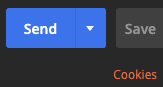
In your request, click the “Cookies” link.
*The “Cookies” link is below the “Send” button in your request.*
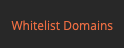
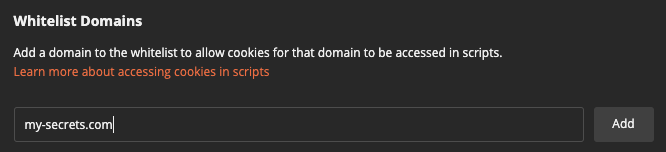
Whitelist a domain.
*This link is located at the bottom-left of the Cookies dialog.*
*Use a fake domain.*
Add a domain to your cookies.
*Add the fake domain to your cookies.*
Add a cookie.
*Add a cookie to the fake domain.*
You can now use the cookie’s value in your request.
## Using the cookie
Use a pre-request script to set a local variable. Local variables only apply to the request per the Postman [documentation](https://learning.postman.com/docs/sending-requests/variables/#variable-scopes).
```js
const cookieJar = pm.cookies.jar();
const cookieName = "apiKey"
cookieJar.get('my-secrets.com', cookieName, (error, cookie) => {
if (error) {
console.error(error);
pm.variables.set(cookieName, "error");
}
if (cookie) {
pm.variables.set(cookieName, cookie);
} else {
console.error("Cookie is missing")
pm.variables.set(cookieName, "missing");
}
});
```
*The pre-request script code.*
Use the variable in the request as usual. In this example, we will use the “apiKey” variable in the headers.
*Setting the header using the variable containing the cookie’s value.*
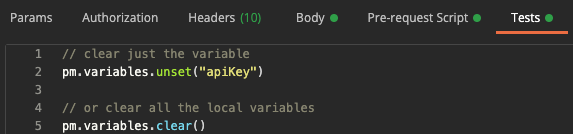
To be safe, make sure to clear the local variables. We will do this in the tests.
```js
// clear just the variable
pm.variables.unset("apiKey")
// or clear all the local variables
pm.variables.clear()
```
*Clearing the variable after the request.*
## Conclusion
The approach will allow you to use secrets in Postman without sharing them with the world.
## Before you go
%%[mailing-list]
### About the author
%%[bio]
*Originally published on [Medium.com](https://medium.com/javascript-in-plain-english/how-to-use-cookies-to-store-secrets-in-postman-afa9a666590d)*
*Photo by [Christina Branco](https://unsplash.com/@starvingartistfoodphotography) on [Unsplash](https://unsplash.com)*
 *The “Cookies” link is below the “Send” button in your request.*
Whitelist a domain.
*The “Cookies” link is below the “Send” button in your request.*
Whitelist a domain.
 *This link is located at the bottom-left of the Cookies dialog.*
 *Use a fake domain.*
Add a domain to your cookies.
*Use a fake domain.*
Add a domain to your cookies.
 *Add the fake domain to your cookies.*
Add a cookie.
*Add the fake domain to your cookies.*
Add a cookie.
 *Add a cookie to the fake domain.*
You can now use the cookie’s value in your request.
## Using the cookie
Use a pre-request script to set a local variable. Local variables only apply to the request per the Postman [documentation](https://learning.postman.com/docs/sending-requests/variables/#variable-scopes).
```js
const cookieJar = pm.cookies.jar();
const cookieName = "apiKey"
cookieJar.get('my-secrets.com', cookieName, (error, cookie) => {
if (error) {
console.error(error);
pm.variables.set(cookieName, "error");
}
if (cookie) {
pm.variables.set(cookieName, cookie);
} else {
console.error("Cookie is missing")
pm.variables.set(cookieName, "missing");
}
});
```
*Add a cookie to the fake domain.*
You can now use the cookie’s value in your request.
## Using the cookie
Use a pre-request script to set a local variable. Local variables only apply to the request per the Postman [documentation](https://learning.postman.com/docs/sending-requests/variables/#variable-scopes).
```js
const cookieJar = pm.cookies.jar();
const cookieName = "apiKey"
cookieJar.get('my-secrets.com', cookieName, (error, cookie) => {
if (error) {
console.error(error);
pm.variables.set(cookieName, "error");
}
if (cookie) {
pm.variables.set(cookieName, cookie);
} else {
console.error("Cookie is missing")
pm.variables.set(cookieName, "missing");
}
});
```
 *The pre-request script code.*
Use the variable in the request as usual. In this example, we will use the “apiKey” variable in the headers.
*The pre-request script code.*
Use the variable in the request as usual. In this example, we will use the “apiKey” variable in the headers.
 *Setting the header using the variable containing the cookie’s value.*
To be safe, make sure to clear the local variables. We will do this in the tests.
```js
// clear just the variable
pm.variables.unset("apiKey")
// or clear all the local variables
pm.variables.clear()
```
*Setting the header using the variable containing the cookie’s value.*
To be safe, make sure to clear the local variables. We will do this in the tests.
```js
// clear just the variable
pm.variables.unset("apiKey")
// or clear all the local variables
pm.variables.clear()
```
 *Clearing the variable after the request.*
## Conclusion
The approach will allow you to use secrets in Postman without sharing them with the world.
## Before you go
%%[mailing-list]
### About the author
%%[bio]
*Clearing the variable after the request.*
## Conclusion
The approach will allow you to use secrets in Postman without sharing them with the world.
## Before you go
%%[mailing-list]
### About the author
%%[bio]