# Browser Extensions Can Have Malware: My Shock of “The Great Suspender” Chrome and Edge Extensions
For a couple of weeks, I have been pondering whether my browser extensions could be a source of vulnerabilities. It turns out they can!
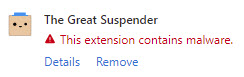
A couple of days ago, I received a notification from the Microsoft Edge browser warning me about malware in one of my extensions: The Great Suspender.
I started panicking, so I decided I would start researching this. I found the GitHub repository for The Great Suspender extension. I searched for “malware” in the open issues and surprisingly found a relevant issue.
[**SECURITY: New maintainer is probably malicious**](https://github.com/greatsuspender/thegreatsuspender/issues/1263)
Here are a couple of snippets from the issue that increased my concerns.
> On November 6th, [@lucasdf](http://twitter.com/lucasdf) discovered a smoking gun that the new maintainer is malicious.
>
> Using the chrome web store version of this extension, without disabling tracking, will execute code from an untrusted third-party on your computer, with the power to modify any and all websites that you see.
I have been running anti-malware software and running scans daily, and there were no reports of malware. It occurred to me that anti-virus and anti-malware might only catch malware running on the machine.
Fortunately, I have been running the Malwarebytes browser extension for a few months. I hope this helped mitigate some of the issues, yet the malware might have been present since November 2019 (that more than one year ago at the time of this writing).
## My actions steps
I started to take action right away.
* I uninstalled the extension from the Microsoft Edge browser. Edge had already disabled it for me and no longer allows anyone to install it.
* I uninstalled the extension from the Chrome browser. I also reported abuse since Chrome still allows anyone to install it.
* I fully cleaned my browsers by clearing the all-time history, cache, etc.
* I ran CCleaner to do a full cache clean on my machine.
* I installed another anti-virus program and ran a full, deep scan just if my anti-malware program missed anything.
* I started to changed passwords to my sensitive accounts.
* I revisited my browser extension preferences, which I will discuss in further detail.
From what I can tell, there is no breach. I hope it stays that way.
## Updated browser extension preferences
I did the following to improve my browser extensions:
* I updated all the remaining extensions by visiting Manage Extensions, enabling Developer Mode, and performing an Update.
* I checked the extension permissions and realized I was giving the “keys of the kingdom” to all my extensions, so I put that to an end.
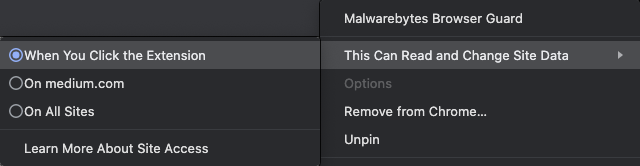
* I visited each of the extension preferences, navigated to This Can Read and Change Site Data, and set the permission to When You Click the Extension. I implemented this setting to all extensions except those meant to “protect” me, such as the Malwarebytes Browser Guard extension. _Note: The screen capture below shows the restricted setting for illustration purposes._
Now, when I want to use an extension, I need to activate it.
The extension is currently disabled.
It is somewhat of an inconvenience. Yet, I still benefit from the extension only when I want to use it instead of when the extension wants to do something.
## Conclusion
Decide whether it makes sense to install a browser extension, whether you can trust it, and how much of your data you are willing to give away.
Consider implementing the extension settings I showed above, and visit sensitive web sites (e.g., banking sites) using Incognito Mode.
## Before you go
%%[mailing-list]
### About the author
%%[bio]
*Originally published on [Medium.com](https://medium.com/nerd-for-tech/malware-in-browser-extensions-3805e8763dd5)*
*Photo by [Michael Geiger](https://unsplash.com/@jackson_893) on [Unsplash](https://unsplash.com)*
 I started panicking, so I decided I would start researching this. I found the GitHub repository for The Great Suspender extension. I searched for “malware” in the open issues and surprisingly found a relevant issue.
[**SECURITY: New maintainer is probably malicious**](https://github.com/greatsuspender/thegreatsuspender/issues/1263)
Here are a couple of snippets from the issue that increased my concerns.
> On November 6th, [@lucasdf](http://twitter.com/lucasdf) discovered a smoking gun that the new maintainer is malicious.
>
> Using the chrome web store version of this extension, without disabling tracking, will execute code from an untrusted third-party on your computer, with the power to modify any and all websites that you see.
I have been running anti-malware software and running scans daily, and there were no reports of malware. It occurred to me that anti-virus and anti-malware might only catch malware running on the machine.
Fortunately, I have been running the Malwarebytes browser extension for a few months. I hope this helped mitigate some of the issues, yet the malware might have been present since November 2019 (that more than one year ago at the time of this writing).
## My actions steps
I started to take action right away.
* I uninstalled the extension from the Microsoft Edge browser. Edge had already disabled it for me and no longer allows anyone to install it.
* I uninstalled the extension from the Chrome browser. I also reported abuse since Chrome still allows anyone to install it.
* I fully cleaned my browsers by clearing the all-time history, cache, etc.
* I ran CCleaner to do a full cache clean on my machine.
* I installed another anti-virus program and ran a full, deep scan just if my anti-malware program missed anything.
* I started to changed passwords to my sensitive accounts.
* I revisited my browser extension preferences, which I will discuss in further detail.
From what I can tell, there is no breach. I hope it stays that way.
## Updated browser extension preferences
I did the following to improve my browser extensions:
* I updated all the remaining extensions by visiting Manage Extensions, enabling Developer Mode, and performing an Update.
I started panicking, so I decided I would start researching this. I found the GitHub repository for The Great Suspender extension. I searched for “malware” in the open issues and surprisingly found a relevant issue.
[**SECURITY: New maintainer is probably malicious**](https://github.com/greatsuspender/thegreatsuspender/issues/1263)
Here are a couple of snippets from the issue that increased my concerns.
> On November 6th, [@lucasdf](http://twitter.com/lucasdf) discovered a smoking gun that the new maintainer is malicious.
>
> Using the chrome web store version of this extension, without disabling tracking, will execute code from an untrusted third-party on your computer, with the power to modify any and all websites that you see.
I have been running anti-malware software and running scans daily, and there were no reports of malware. It occurred to me that anti-virus and anti-malware might only catch malware running on the machine.
Fortunately, I have been running the Malwarebytes browser extension for a few months. I hope this helped mitigate some of the issues, yet the malware might have been present since November 2019 (that more than one year ago at the time of this writing).
## My actions steps
I started to take action right away.
* I uninstalled the extension from the Microsoft Edge browser. Edge had already disabled it for me and no longer allows anyone to install it.
* I uninstalled the extension from the Chrome browser. I also reported abuse since Chrome still allows anyone to install it.
* I fully cleaned my browsers by clearing the all-time history, cache, etc.
* I ran CCleaner to do a full cache clean on my machine.
* I installed another anti-virus program and ran a full, deep scan just if my anti-malware program missed anything.
* I started to changed passwords to my sensitive accounts.
* I revisited my browser extension preferences, which I will discuss in further detail.
From what I can tell, there is no breach. I hope it stays that way.
## Updated browser extension preferences
I did the following to improve my browser extensions:
* I updated all the remaining extensions by visiting Manage Extensions, enabling Developer Mode, and performing an Update.


 * I checked the extension permissions and realized I was giving the “keys of the kingdom” to all my extensions, so I put that to an end.
 * I visited each of the extension preferences, navigated to This Can Read and Change Site Data, and set the permission to When You Click the Extension. I implemented this setting to all extensions except those meant to “protect” me, such as the Malwarebytes Browser Guard extension. _Note: The screen capture below shows the restricted setting for illustration purposes._
 Now, when I want to use an extension, I need to activate it.
 The extension is currently disabled.
 It is somewhat of an inconvenience. Yet, I still benefit from the extension only when I want to use it instead of when the extension wants to do something.
## Conclusion
Decide whether it makes sense to install a browser extension, whether you can trust it, and how much of your data you are willing to give away.
Consider implementing the extension settings I showed above, and visit sensitive web sites (e.g., banking sites) using Incognito Mode.
## Before you go
%%[mailing-list]
### About the author
%%[bio]
It is somewhat of an inconvenience. Yet, I still benefit from the extension only when I want to use it instead of when the extension wants to do something.
## Conclusion
Decide whether it makes sense to install a browser extension, whether you can trust it, and how much of your data you are willing to give away.
Consider implementing the extension settings I showed above, and visit sensitive web sites (e.g., banking sites) using Incognito Mode.
## Before you go
%%[mailing-list]
### About the author
%%[bio]